
Native Swift app
Built on Apple frameworks
Core Audio taps, ScreenCaptureKit, EventKit, MLX Swift. One dedicated Mac app that treats the machine as the speech engine.
Dettivo is a Mac app, not a model. This is the full surface, the things that feel obvious once you’ve used it, the things you find in Settings on day seven, and the developer plumbing we didn’t make you hunt for.
§01 Dictation core
The core loop. Hold a hotkey, speak, release. Dettivo types into the focused app. Every behavior is a setting.
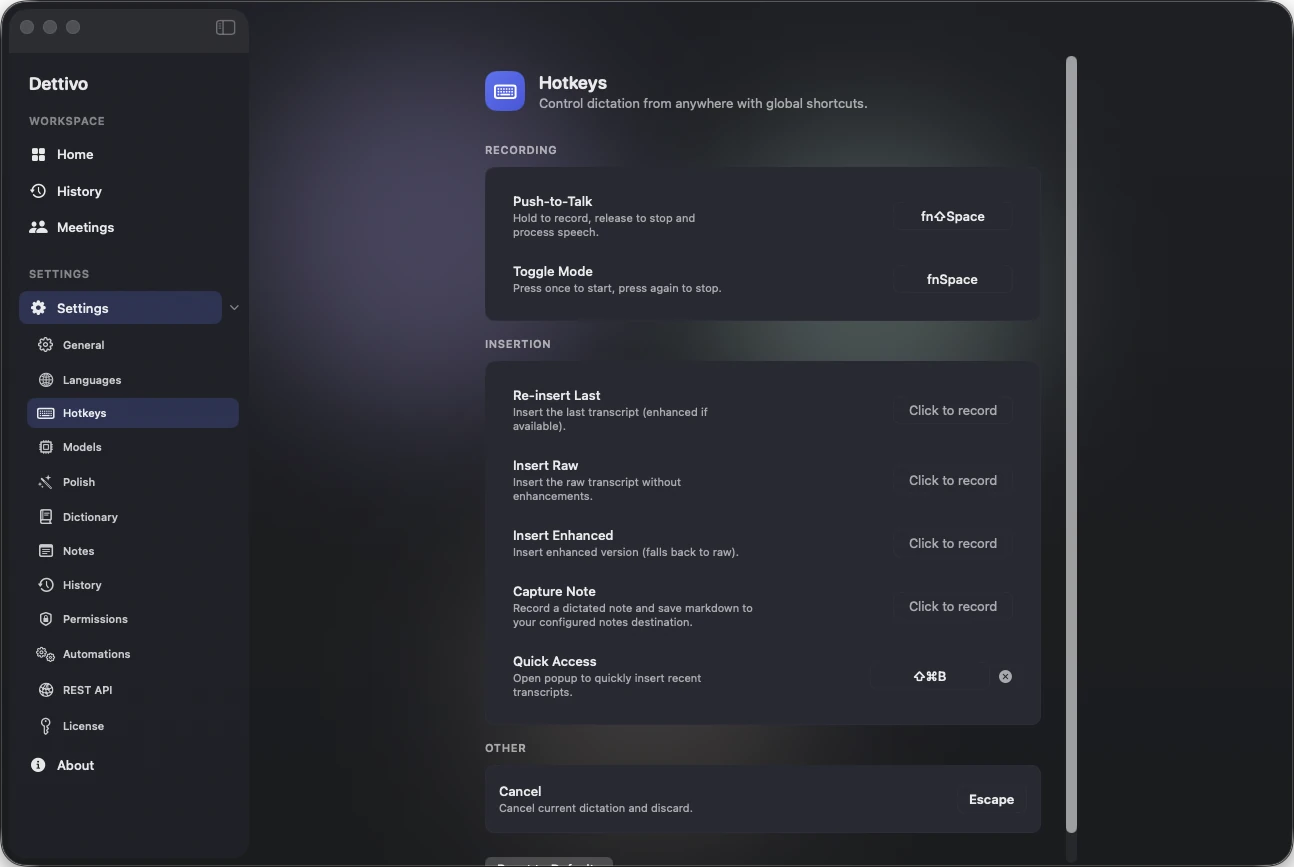
Configurable in Settings › Hotkeys. Per-language overrides.
Pick the interaction model per profile.
Every word, punctuation off. Fastest path.
Deterministic dictionary corrections + replacement rules. No LLM, no network, instant clean output.
Polished with your chosen backend, app profile applied.
Dettivo types into the frontmost app with a safe paste + restore.
If insertion is blocked, the transcript is already copied.
⌘Z rolls back insertion within a 5s window.
Non-activating HUD that doesn’t steal focus.
Press Esc, no artifacts stored.
Dettivo refuses to insert into password fields.
Profiles can match the mic’s language on the fly.
Hotkeys, vocabulary, polish rules, models, all scoped.
Per-language replacement map applied before polish.
Different mic on battery vs AC.
Gain boost for quiet dictation input.
Different Enhanced style per app (Slack vs email).
Pick a target language; Enhanced output is translated.
Optional. OpenAI-compatible endpoints for dictation only.
Load on app launch or first use.
Pick speed over fidelity (or the reverse) per language profile.
Prevents runaway capture from slow adapters.
Dettivo warns if the focused app changed mid-session.
Optional inline edit pass after a phrase you re-spoke is recognized. Off by default; review-first.
§02 Polish + context
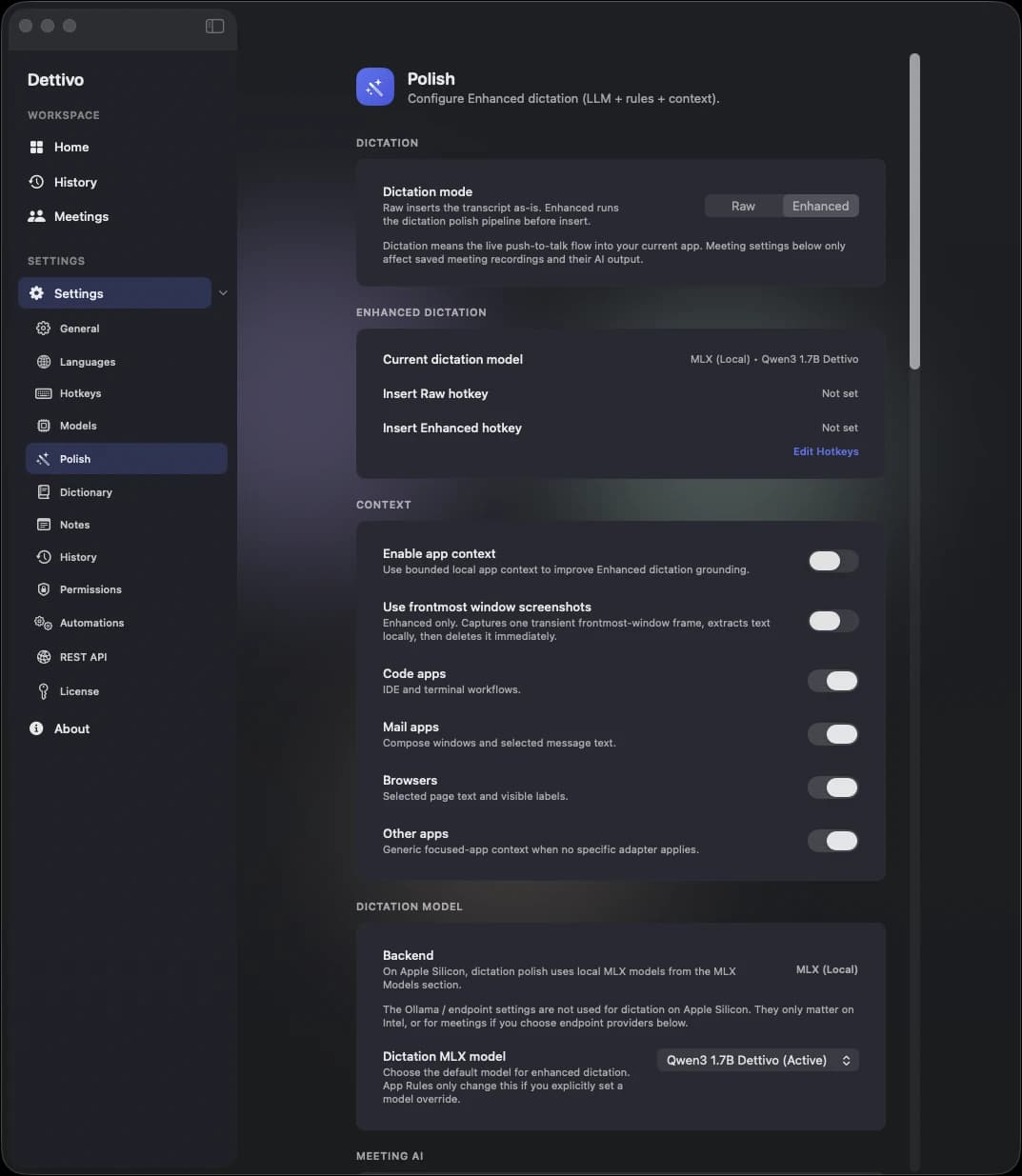
Enhanced mode doesn’t guess. It reads the room: the focused app, the current selection, the language profile, and (opt-in) a screenshot of the window. Context in, clean text out.
Bespoke fine-tuned polish model bundled. No cloud required to get clean output.
Advanced path for proxies, gateways, Ollama, vLLM, and LM Studio.
Use local MLX, hosted OpenAI/Anthropic, or Advanced Endpoint per task.
Bring a compatible local MLX folder or cached Hugging Face MLX repo when curated models are not enough.
Casual · Formal · Professional · Technical · Creative.
Your own system prompt + rules + optional model.
Capitalization · filler removal · grammar · contractions · punctuation.
Override preset + rules per frontmost app.
Bundle ID + app name attached to every Enhanced run.
Reads current selection via Accessibility API.
Optional single-frame capture. Explicit consent required.
Ready · Limited · Blocked with fix path.
Disable context capture per sensitive app.
Dictation tuned for VS Code, Cursor, Zed, JetBrains. Enhanced mode knows you’re writing code.
Paste sample text, try presets before using live.
Per-endpoint allowlist with revoke controls.
If polish config decodes wrong, reset + non-blocking banner.
E.g., code `@path` formatting applied in editors.
Trigger phrases expand to longer strings during Polish. Configured in Settings › General. Distinct from dictionary terms (spelling) and macros (commands).
Dictionary → replacements → snippet → punctuation → app-target. Deterministic; no model in the loop.
Raw speech
Context attached
Enhanced output
Enhanced never silently downgrades. If context is blocked, Dettivo tells you, and gives you a one-click path to fix it. No hidden coupling between Polish, Automations, and Capture, each pane owns a setting, every pane shows the effective state.
§03 Quick Note + Meeting Mirror
Dictate a thought. Dettivo writes it to a folder you control, your Obsidian vault, your context-layer workspace, your daily note, wherever you live.
Separate from dictation. Goes to the folder you picked.
Security-scoped bookmark persists across relaunch.
Unique timestamped file. Default.
Append to Inbox/. Configurable subdir.
Append to Daily/YYYY-MM-DD.md.
created · tags · source app · mode.
Comma-separated. Per-profile.
Or open in default markdown editor.
Every meeting → transcript.md, notes.md, details.md.
Hold ⌘⇧N to dictate a note straight into Inbox.
No editor context. No insertion. Goes to the folder you picked in Settings › Notes.
Meeting Mirror
Weekly sync · Platform · 32 min
transcript.md
Full raw + polished transcript, speaker-labeled, timestamped.
notes.md
Summary, decisions, action items, blockers, follow-up draft.
details.md
Metadata: attendees, duration, provider, diarization, calendar.
§04 Meetings capture
A dedicated Meetings workspace. System audio plus mic, no bot joining the call. Live transcript streaming in, final canonical transcript after stop.
Primary system-audio path on macOS 14+.
Automatic when Core Audio tap unavailable.
Live warning when capture degrades, before data loss.
System audio re-attempted across capture paths.
Handles device swap mid-meeting.
Pick which app to capture audio from.
If target missing, capture the whole system.
Hide specific apps from capture.
Streaming segments while recording.
Stable re-transcription after stop.
Toggle at the transcript panel.
Mono timestamps · speaker above text.
Full-text index across every meeting.
meetings/<sessionId>/ with audio + metadata.
Live checkpoint + retained audio restore transcript.
Even if final never produced.
Visible in Meetings workspace footer.
Per first meeting start.
On-device after final transcript.
Rename once; saved as suggestion next time.
Who talked when, % share, ratio.
Suggests names from the transcript context.
Per-meeting destructive delete in More menu.
Every artifact path shown in Settings › History.
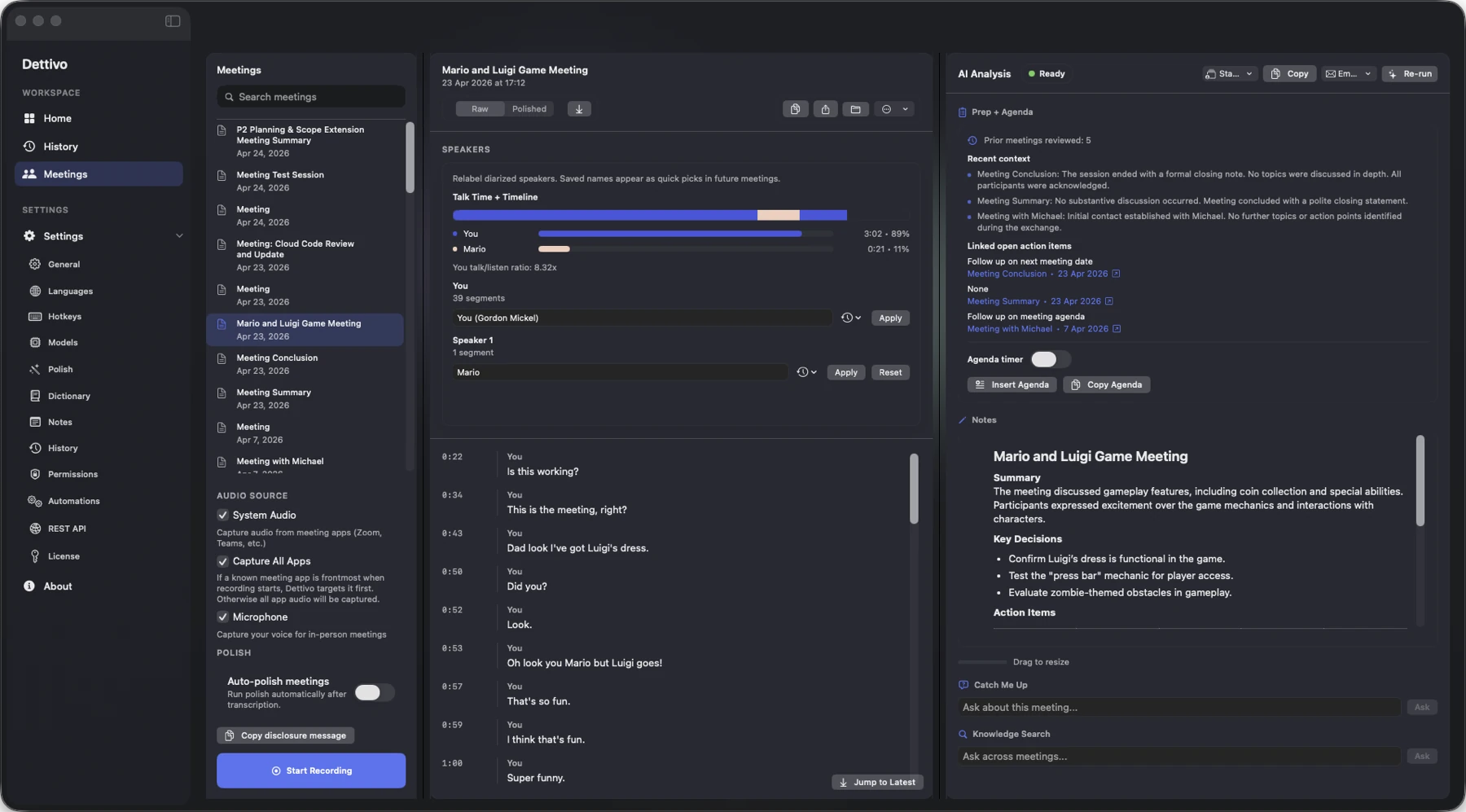
Diarized + named
Saved names reused next time. No cloud look-up.
§05 Notes + analysis + prep
Editable notes next to AI summary, action items, decisions, blockers, follow-up draft, every one a separate block, rerun without stomping your edits.
In-place markdown editor, autosave with debounce.
Concise, cite-free, scoped to the transcript.
Extracted, owner-tagged when names available.
What the group agreed to.
Unresolved items flagged for follow-up.
Ready-to-send recap draft.
Generated from analysis output.
Re-run with a different provider without losing notes.
Curated local models stay recommended; power users can test compatible MLX folders or Hugging Face MLX repos.
Standard · Project Sync · Client/Sales · Standup.
Markdown template to clipboard.
Prior-meeting highlights + linked open action items.
15 / 30 / 45 / 60 m countdown overlay.
Ask this single meeting a question.
Ask across every meeting, inline citations.
Open the source meeting from a citation.
Even when auto is disabled.
Running · Failed · Unavailable · Ready · Auto-off · Not Run.
Edits separated from generated summary baseline.
Standard / Project Sync / Client/Sales / Standup.
You asked
Who owned the rollback plan for the API cutover?
§06 Automation + email
Auto-send a recap to the people who were in the room. Weekly digest of open action items. Draft-only if that’s safer.
On analysis complete, generate + deliver recap.
Trailing action-items summary, scheduled.
Safe default. Nothing leaves your Mac unless you say.
Opens a draft in Mail.app, no send.
Gmail (OAuth) · Microsoft Graph (OAuth) · SMTP.
Hosted meeting AI and email provider keys stay local and revocable.
Comma-separated or seeded from calendar.
Duplicate triggers return the same run ID, no double-send.
Latest run: Succeeded · Failed · Running · Queued + error detail.
Org mode gated by policy.
Attach / link / redact.
One toggle in Settings › Automations, drains pending queue.
Meeting Recap · draft
Summary
API cutover scheduled for 8 May · 09:00 Zurich. Elena owns the final load test, Marco drafts the rollback plan.
Action items
Delivery → Send via Gmail · recipients from calendar · draft-only is one toggle away
§07 Calendar + prep
EventKit-aware. Dettivo spots upcoming meetings via your local calendar, your events never leave your Mac.
Settings › Permissions. EventKit full access.
Card appears N minutes before meeting.
Configurable in Settings.
Pre-fills meeting title.
Organizer + attendees available to automations.
Calendar notes / location / URL inform capture target.
Heuristics for Zoom/Meet/Teams from event fields.
Not now / snooze without opting out of future prompts.
§08 Macros + safety
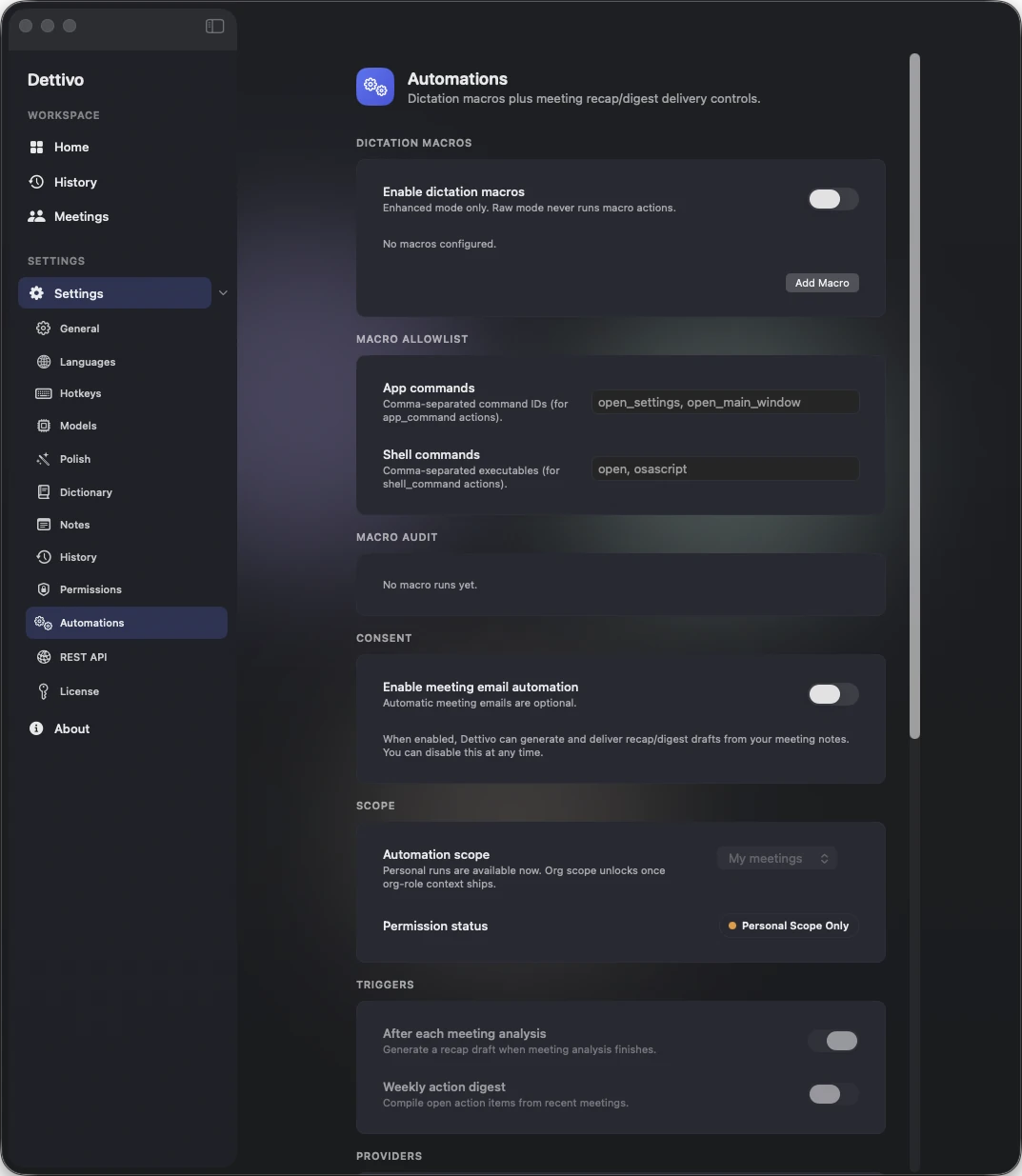
Dictation macros wire trigger phrases to actions. Deny by default. Allowlists are explicit. Every run lands in the audit log.
Speak a phrase, run a defined action.
Expands to snippet, formats, handles variables.
Controlled via allowlist + confirmation.
Explicit allowlist. Never runs un-vetted.
Every run asks first.
Allows run-once, always-allow, cancel.
Only after explicit opt-in.
Add · edit · delete entries; non-allowlisted blocked.
Trigger · run · blocked · failed · cancelled · dropped events.
Enhanced dictation shows "Context + Polish + Automation" applied.
Heard
“hey dettivo, ship staging”
Deny-by-default · allowlists · every run auditable
§09 History + retention
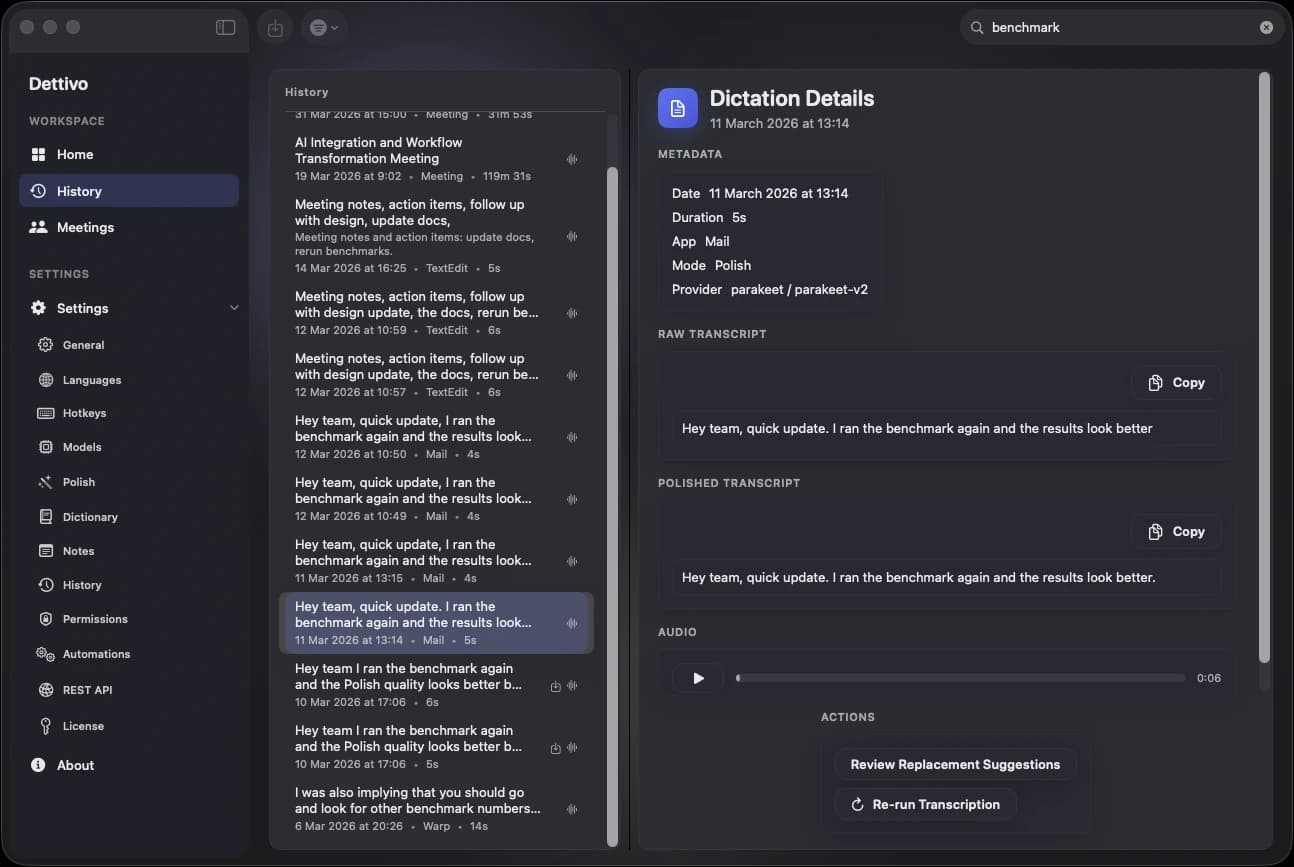
Every dictation, every meeting, every artifact, searchable, replayable, re-transcribable, deletable. Retention you actually control.
Every session saved with metadata.
Transcript + audio + analysis artifacts.
Across both dictation and meeting transcripts.
Raw / Polish / Enhanced / app / provider.
In-line player for audio-stored sessions.
Swap STT model or provider; keeps raw + final.
Separate actions, separate outputs.
Markdown · Plain · JSON · SRT · VTT.
Dictation files + meeting recordings.
Removes entry + audio artifact.
One button. No undo, no apology.
Store or drop raw audio per session.
Day-based retention window for meetings.
Every file path shown in the clear.
§10 CLI · REST · MCP
The same IPC contract drives the bundled CLI, a loopback REST adapter, and a stdio MCP server. Token-gated. Loopback only. No cloud.
~/Library/…/Dettivo/dettivo.sock · 0600 · peer UID auth.
Optional shared token layered on peer auth.
env · Keychain · ~/Library/…/ipc.token.
One toggle. 127.0.0.1:45831. Bearer auth. Maps IPC → HTTP.
POST /v1/transcripts/import/stream with raw audio.
GET /v1/transcripts/export/stream.
dettivo mcp serve · stdio · MCP 1.0.
--host claude-desktop | cursor | codex · --write.
list · get · search · start/stop dictation · start meeting · import · export · insert.
transcript://{id} · meeting://{id} · status://current · search-url scheme.
start · stop · cancel · status.
start · stop · list · latest.
list · get · search · latest · export · insert.
transcript import --target-kind meeting.
test · presets · rules.
plain · markdown · json (for scripts).
0 ok · 1 error · 2 not running · 3 perm · 4 args · 5 timeout.
Symlink into ~/.local/bin/dettivo.
Dictate directly into Claude Code, Codex, and other agent CLIs. No extensions required.
Everything a CLI can do, MCP can. And REST. And app.
Developer surface is 100% localhost.
$ dettivo status● running · dictation idle · 2 meetings today$ dettivo transcript latest --format markdown# Weekly sync, Platform
* API cutover 8th, 09:00 Zurich
* Elena: load test$ dettivo mcp config --host claude-desktop --write✓ installed in ~/Library/Application Support/Claude
CLI · dettivo(1)
§11 Permissions + privacy
Staged, explainer-driven, reversible. Dettivo asks only for what the feature at hand needs. Every permission has a fix path.
Required for every capture.
For insertion + selection context. Clipboard fallback exists.
Global hotkeys. Key-up / key-down detection.
Meetings (fallback path) + optional window screenshots.
Optional. Upcoming meeting prompts.
If revoked, Dettivo re-opens onboarding.
No app restart required.
Exact pane for every missing permission.
Disable context capture for sensitive apps.
Always-on while capturing.
Settings › History › Delete all. No apology modal chain.
§12 License + updates
One lifetime license, three active devices, Keychain storage, signed updates. The server knows the key, the device IDs, and your email, nothing else.
Paste key → validate → go.
License stored securely on first activation.
Ship a support request with context.
Settings › Cloud › Device activations.
From any active Mac. Four-device block → revoke → go.
License signs every update artifact fetch.
Copy JSON snapshot for support.
Scrubs license + JWT before writing to ~/Downloads.
Refund revokes license + update access.
Lost key? dettivo.com/recover resends to the purchase email. No login required.
If a permission is revoked or activation breaks, Dettivo re-opens the onboarding step that owns the fix.
Default shortcuts
Dictation
Default, configurable
Quick Note
Your vault
Quick Access
Recall + insert
Cancel dictation
Insert polished
Quick Access
Insert raw
Quick Access
Undo insertion
5-second window
Open history
What actually runs
Native Swift app
Built on Apple frameworks
Core Audio taps, ScreenCaptureKit, EventKit, MLX Swift. One dedicated Mac app that treats the machine as the speech engine.
Right model for the job
Dictation, meetings, and recall each get a path
Whisper and Parakeet handle speech-to-text. Deterministic Polish handles instant cleanup. Enhanced, summaries, and Q&A use the model that fits the work.
Performance budgets
Measured hot paths, not vibes
Time to first insert, warm starts, model downloads, long-audio throughput, and diarization all get benchmarked because speed is part of the product.
Agent-native surface
Apple Silicon, fully utilized
The same local speech memory is exposed through the app, CLI, REST, and MCP so agents and scripts can use it without a cloud hop.
CLI · dettivo(1)
Just launched
One-time license, three active Macs, lifetime updates. Everything on this page is already in the build. $45 once, forever yours.