
CLI · dettivo
Bundled with the app.
status · dictation start/stop · meetings · transcripts · mcp config · polish presets. Script anything, pipe anywhere.
Dettivo turns your Mac into a local speech engine. Dictate into any app, capture meetings without a bot, and give agents access through CLI, REST, and MCP. Built for low-latency Apple Silicon workflows, not cloud transcription round-trips.
Hi team,
On Monday, design@example.com wrote:
Do we have a launch date yet? We need a few days for the final assets.
Built to disappear
59 ms median raw insert
No cloud round-trip
Apple Silicon, local models
One app, whole loop
Dictation + meetings
Same surface for agents
CLI · REST · MCP
WhisperKit tiers and multilingual Parakeet v3, all on-device. Auto-detection on supported engines, per-language profiles for the ones you swap between most.
endefresitptnlsvnodafiplcsruuktrelarhehizhjakovithidmsswafcyand 69 more
I'm dictating strategy notes one hour and capturing CTO calls the next. Dettivo is the one Mac app that does both, and it never sends the audio anywhere I'd have to defend in a compliance review.
Cedric Oeldorf
value creation
Growth Factors
Court files do not belong on third-party servers. Dettivo is the first dictation tool I have used where the architecture matches what the law already requires of me.
Perica Grasarevic
lawyer (and judge) CH
My Claude Code prompts used to live in a scratchpad. Now they go from voice to the agent in one hotkey, and the agent can grep what I said yesterday through Dettivo's MCP server. Nothing else in the dictation space ships this.
Max Gfeller
engineer CH
Sutro
Hold a hotkey and talk. Dettivo runs local speech-to-text, applies the right cleanup path, and types into the app you are already using.
Settings > Hotkeys · Polish · Languages
Three modes. Raw keeps every word. Polish runs deterministic dictionary corrections, no LLM, no network, instant clean output. Enhanced rewrites with your chosen local or hosted model. Every behavior is a toggle, Dettivo never hides a setting from you.
Push-to-talk, toggle, or hands-free. Independently configurable per language profile with app-level overrides.
Raw keeps every word. Polish runs deterministic dictionary fixes with no LLM. Enhanced rewrites with your chosen local or hosted model. Swap modes mid-transcript.
Typed straight into the focused app. Secure fields detected, clipboard fallback when insertion fails, five-second undo window.
Auto-cleanup of filler, punctuation, contractions, with per-app style overrides. Five built-in presets + your own.
Quiet speech gets a gain boost. Different mic profiles on battery vs AC. VoiceProcessing IO when you want it.
Pop the last few transcripts with a hotkey. Arrow keys navigate. Return inserts polished, ⌘+Return inserts raw.
The pieces that make speech feel native: Quick Note straight into Obsidian, translation before insertion, and screen-aware context for the apps where you work.
Hold ⌘⇧N to dictate a note straight into Inbox.
No editor context. No insertion. Goes to the folder you picked in Settings › Notes.
Pick a folder, your Obsidian vault, your context-layer workspace, wherever. Dictation goes straight there as markdown. No app stealing focus.
Three profiles. Standalone creates a timestamped file. Inbox appends to Inbox/. Daily appends to Daily/YYYY-MM-DD.md. Front-matter optional.
Tags, source app, mode, creation time, all optional, all editable per profile. Your Obsidian vault stays yours.
Enable translation in Settings > Polish. Speak in one language, Dettivo inserts in another. Per-language default.
Per-language vocabulary, custom dictionary, and per-app polish profiles. Dettivo learns what you actually say.
Recognition rules
Per-language. Applied before polish. App-specific profiles can extend it.
Raw speech
Context attached
Enhanced output
Dettivo reads the frontmost app, the selection, and (opt-in) a single window screenshot. Enhanced mode uses it to know what you’re actually talking about.
Dictate into VS Code, Cursor, Zed, JetBrains, and coding agents like Claude Code with no extensions to install. Enhanced mode knows you’re writing code and behaves like it.
Dictionary, app-profile, and language-profile overrides stack. Say a typo-prone word once, teach Dettivo to hear it right every time.
System audio plus microphone. Live transcript. Speaker labels. Editable notes and summaries when you stop recording. No guest joins the call, no cloud transcription service is required.
Core Audio tap by default, ScreenCaptureKit fallback. Dettivo warns you before capture degrades, not after.
Live transcript while recording, final canonical transcript after stop. Speaker labels backfill when diarization runs.
Editable notes live next to AI summary, decisions, action items, and a follow-up draft. Rerun analysis without losing what you wrote.
Every meeting can become local files, searchable memory, and a recap draft. Speaker relabeling remembers who is who next time.
Meeting Mirror
Weekly sync · Platform · 32 min
transcript.md
Full raw + polished transcript, speaker-labeled, timestamped.
notes.md
Summary, decisions, action items, blockers, follow-up draft.
details.md
Metadata: attendees, duration, provider, diarization, calendar.
Meeting Recap · draft
Summary
API cutover scheduled for 8 May · 09:00 Zurich. Elena owns the final load test, Marco drafts the rollback plan.
Action items
Delivery → Send via Gmail · recipients from calendar · draft-only is one toggle away
Diarized + named
Saved names reused next time. No cloud look-up.
You asked
Who owned the rollback plan for the API cutover?
Prep agenda pulls prior decisions + open action items from previous sessions. Walk in already warmed up.
Post-meeting Q&A on any single recording. Ask a question, get a cited answer, copy it out.
Auto-title, auto-summary, auto-action-items, auto-follow-up. Every automation is opt-in, auditable, and cancellable.
EventKit-aware. Dettivo spots upcoming meetings and offers to record with the agenda, attendees, and title pre-filled.
Starting in 3 min
Elena Weber · Marco Ross · You · 45 min
Agenda
Dettivo reads your local calendar through EventKit. Your events never leave your Mac.
Title, attendees, and agenda seed the capture. Pick the meeting-app target or capture everything.
The live transcript checkpoint plus retained audio means an interrupted meeting is not a lost meeting.
If system audio drops, Wi-Fi dies, or macOS sleeps mid-call, Dettivo restores the final transcript from the retained audio buffer. No duct tape.
Interrupted
Weekly sync · 27 min captured
Dictate code-review comments, commit messages, issue updates, terminal notes, and long agent prompts into the tools already on screen. The same local speech memory is exposed through a bundled CLI, loopback REST adapter, and stdio MCP server.
Shared contract
socket → ~/Library/…/Dettivo/dettivo.sock
rest → 127.0.0.1:45831/v1
mcp → stdio · tools + resources
Peer UID auth · per-user token · 0600 socket · no cloud
$ dettivo status● running · dictation idle · 2 meetings today$ dettivo transcript latest --format markdown# Weekly sync, Platform
* API cutover 8th, 09:00 Zurich
* Elena: load test$ dettivo mcp config --host claude-desktop --write✓ installed in ~/Library/Application Support/Claude
CLI · dettivo
Bundled with the app.
status · dictation start/stop · meetings · transcripts · mcp config · polish presets. Script anything, pipe anywhere.
REST · loopback only
One toggle, token-gated.
Settings › API flips on a 127.0.0.1 HTTP adapter over the same IPC. Bearer tokens. Streaming import/export endpoints.
MCP · stdio
dettivo mcp serve
Drop the config line into Claude Desktop, Cursor, or Codex with mcp config --write. Tools: search_transcripts, insert_transcript, start_meeting, more.
Heard
“hey dettivo, ship staging”
Deny-by-default · allowlists · every run auditable
, Dictation macros · Settings › Automations
Dictation macros
Map trigger phrases to actions: insert text, run an app command, execute a shell command. Safety policies default to deny. Allowlists are explicit. Every run lands in the audit log.
First-use confirmation
Run once, always allow, or cancel. Dettivo never runs a command it hasn’t been explicitly cleared for.
Audit log
trigger_detected · confirm_shown · run_started · run_completed. Stored locally, exportable, scrollable.
Dettivo sits between your voice, your Mac apps, and your local automation surface. Nothing to install downstream. Nothing to swap.
Vault as context layer
Quick Note → Inbox/. Mirror Meeting → Meetings/ tree.
Recap + digests
Draft-only, auto-compose, or direct send with your account.
Dictate anywhere
Type into the focused app. Clipboard fallback if insertion fails.
First-class for IDEs
Enhanced mode is tuned for code. No extension to install.
MCP server, one command away
Your dictations + meetings become tools for your agent.
EventKit-aware
Upcoming-meeting prompt seeded with agenda + attendees.
Performance promise
The hot path is built around one question: how quickly does useful text appear where you are working? Raw dictation lands in the focused app in a few dozen milliseconds. Enhanced adds about 200 ms of local polish, with deterministic cleanup short-circuiting model work whenever it can.
raw stop → insert · median
0ms
Median 59 ms · p95 123 ms · Apple Silicon, Accessibility on, model prewarmed. Enhanced adds about 200 ms.
A keyboard-first popup for the last thing you said. Search, navigate with arrows, insert polished or raw.
Voicemail reply · client onboarding
1hHey, just confirming we can kick off next Tuesday. I’ll send a calendar invite.
Quick note · benchmark numbers
2hAPI p95 dropped from 180 ms to 42 ms after the caching change. Keep an eye on the 99th.
Slack reply · design feedback
3hThe density feels right. Let’s tighten the inspector padding by 2 px before merging.
Filter by mode or source app. Search by content. Jump back to history. Quick Access is for when you forget where you said the thing.
Import dictation files into History, or bring an external meeting recording into Meetings so it gets the same local transcript and notes flow.
Per-meeting + global retention. Auto-delete by age. Every artifact path shown in the clear. Delete all is one click.
Six choices Dettivo makes on purpose. The rest of the app follows from them.
Latency
We chase milliseconds, not benchmarks. The first character on screen matters more than the final transcript.
Local by architecture
Privacy is where the audio runs, not a policy page. Speech-to-text stays on Apple Silicon by default.
No bots
Your meeting stays between the people in it. We never send a guest into your call.
Honest defaults
Review-first corrections. No silent downgrades. Every behavior is a toggle you can see.
Open formats
Plain markdown in a folder you control. Transcripts you can grep, agents you can swap, vault you own.
Lifetime ownership
Buy once. Three Macs. Signed updates forever. No subscription. No lock-in.
Dettivo is not a wrapper around a model. It is a Mac speech workstation that knows which window you are in, which mic you are on, which meeting is about to start, and which folder your notes belong in. The commitment is simple: local by default, fast enough to disappear, complete enough for dictation and meetings, and open enough for agents to use.
A dedicated Swift app built on Apple frameworks. No Electron shell, no browser runtime.
Median 59 ms on Apple Silicon. Enhanced mode adds ~200 ms of bespoke polish on top.
CLI, REST, and MCP expose dictation, transcripts, and meetings to local agents.
License + updates are the only unavoidable network calls.
§ The math
Most tools that do less than Dettivo charge almost what Dettivo costs once, every month. Bar lengths below are proportional to five years of paying. Numbers from public pricing pages.
Dettivo
$45 · once
$720 · 5 yr @ $15/mo
$1,080 · 5 yr @ $18/mo
$1,020 · 5 yr @ $16.99/mo
$400 · 5 yr @ $8.49/mo
After three months on any of them, you’ve paid more than Dettivo costs you forever.
Enough diagrams. This is the real app, every pixel of the Dettivo you install, captured on a Mac that’s been using it daily.
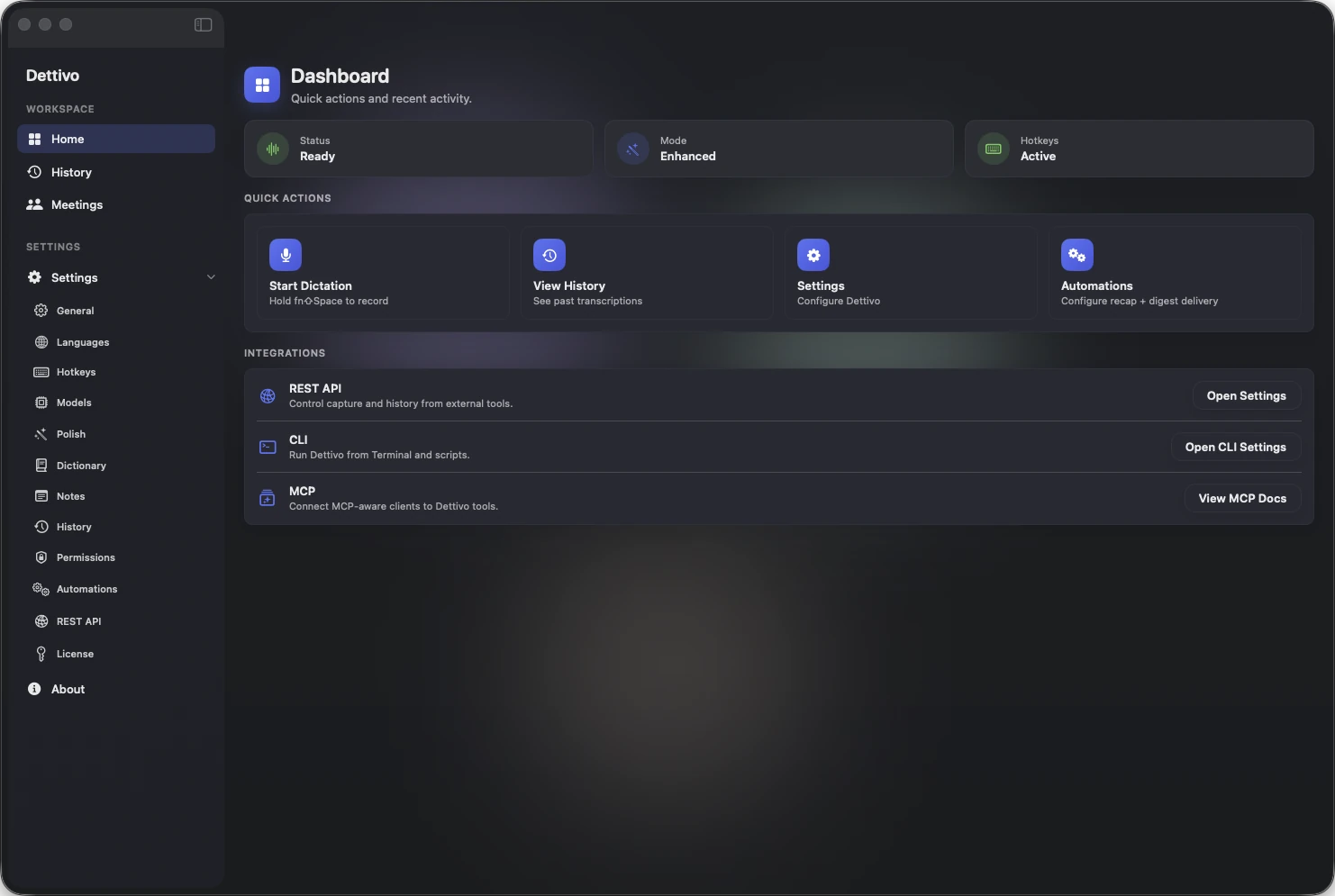
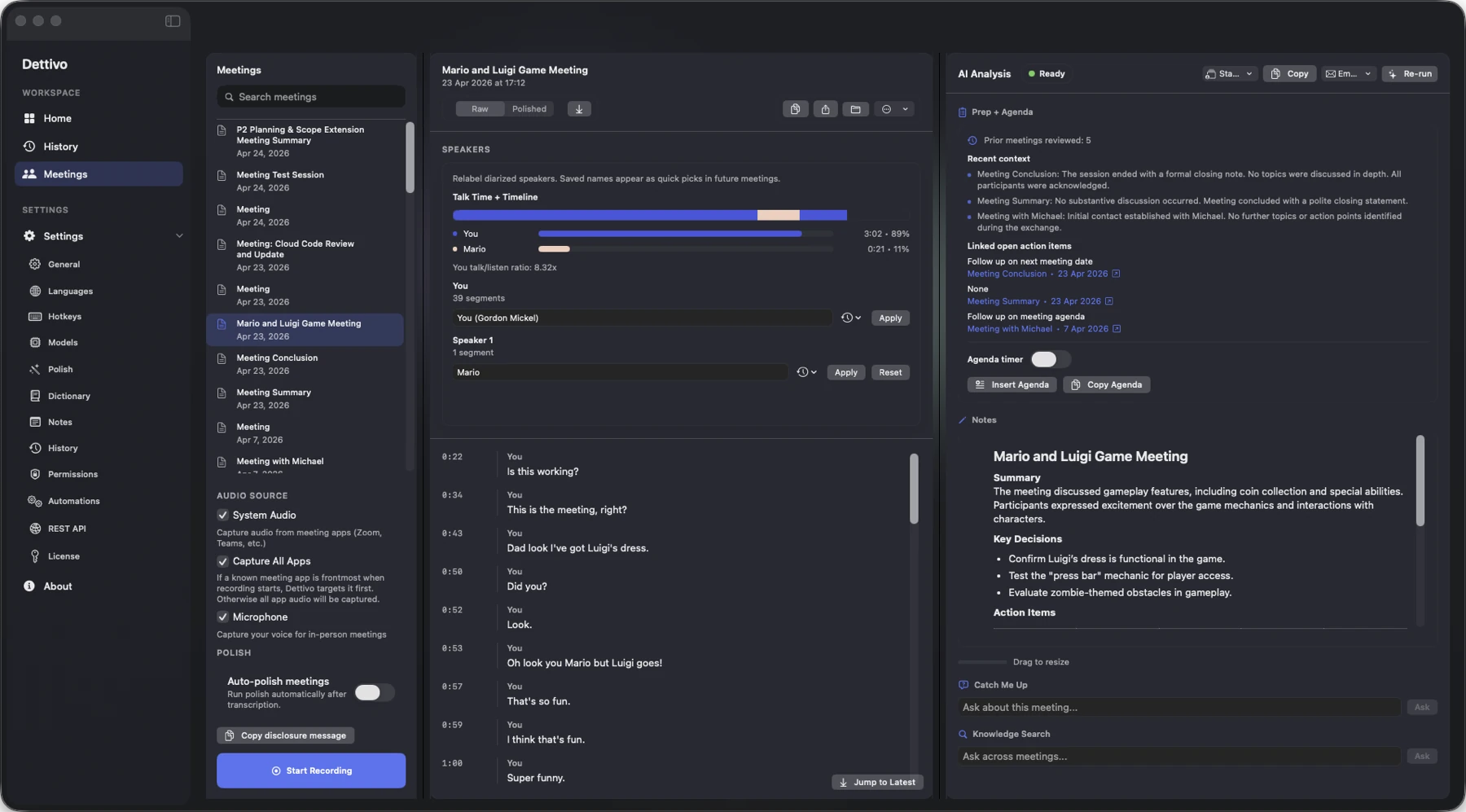
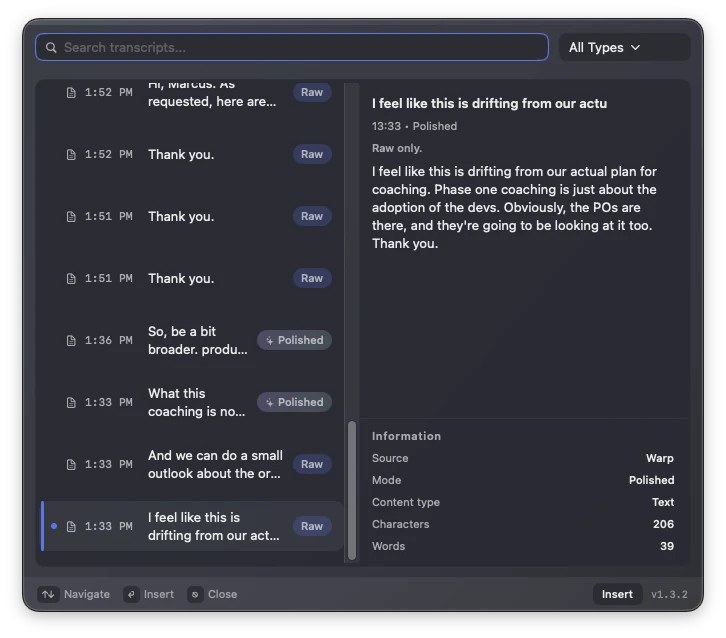
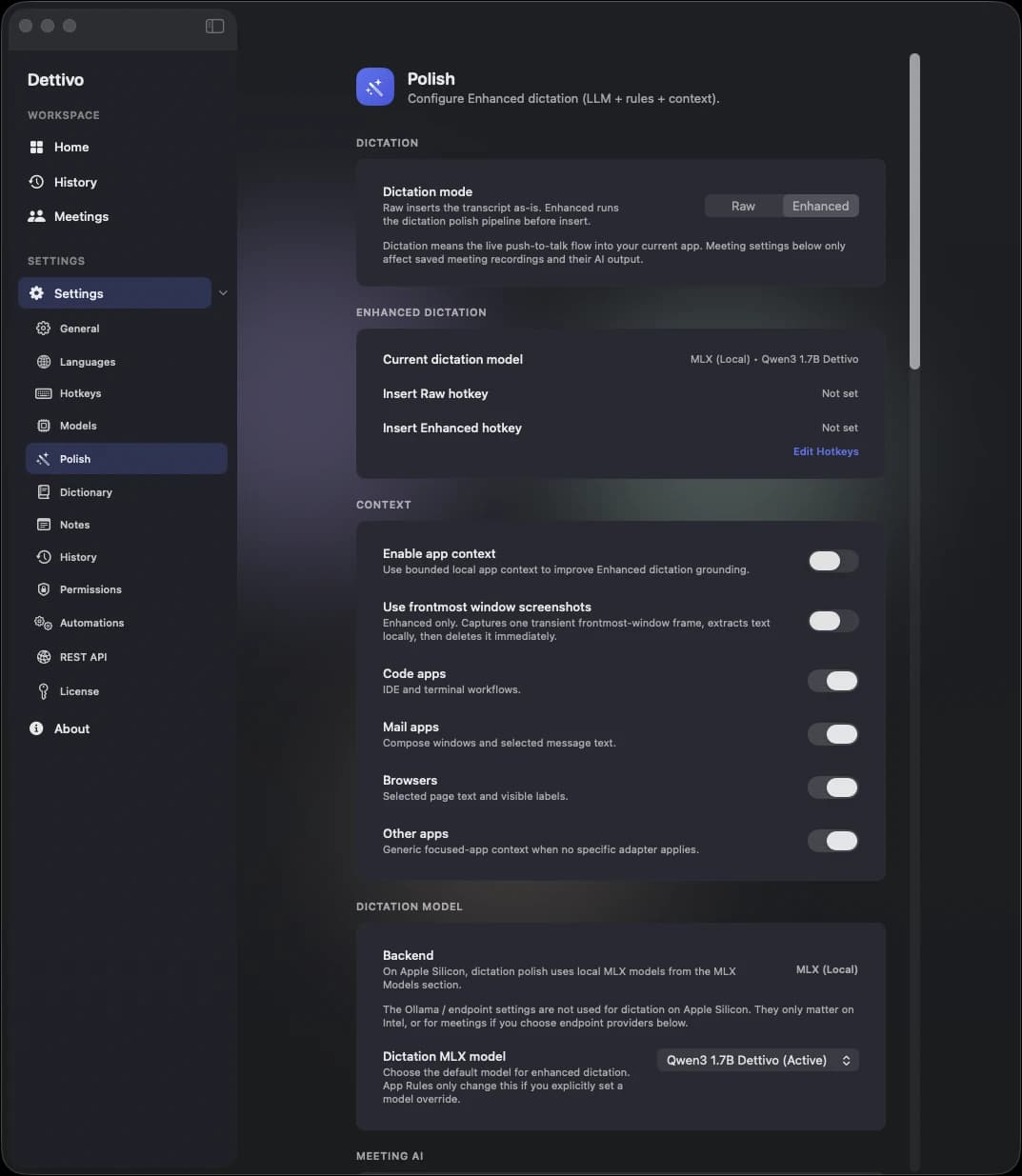
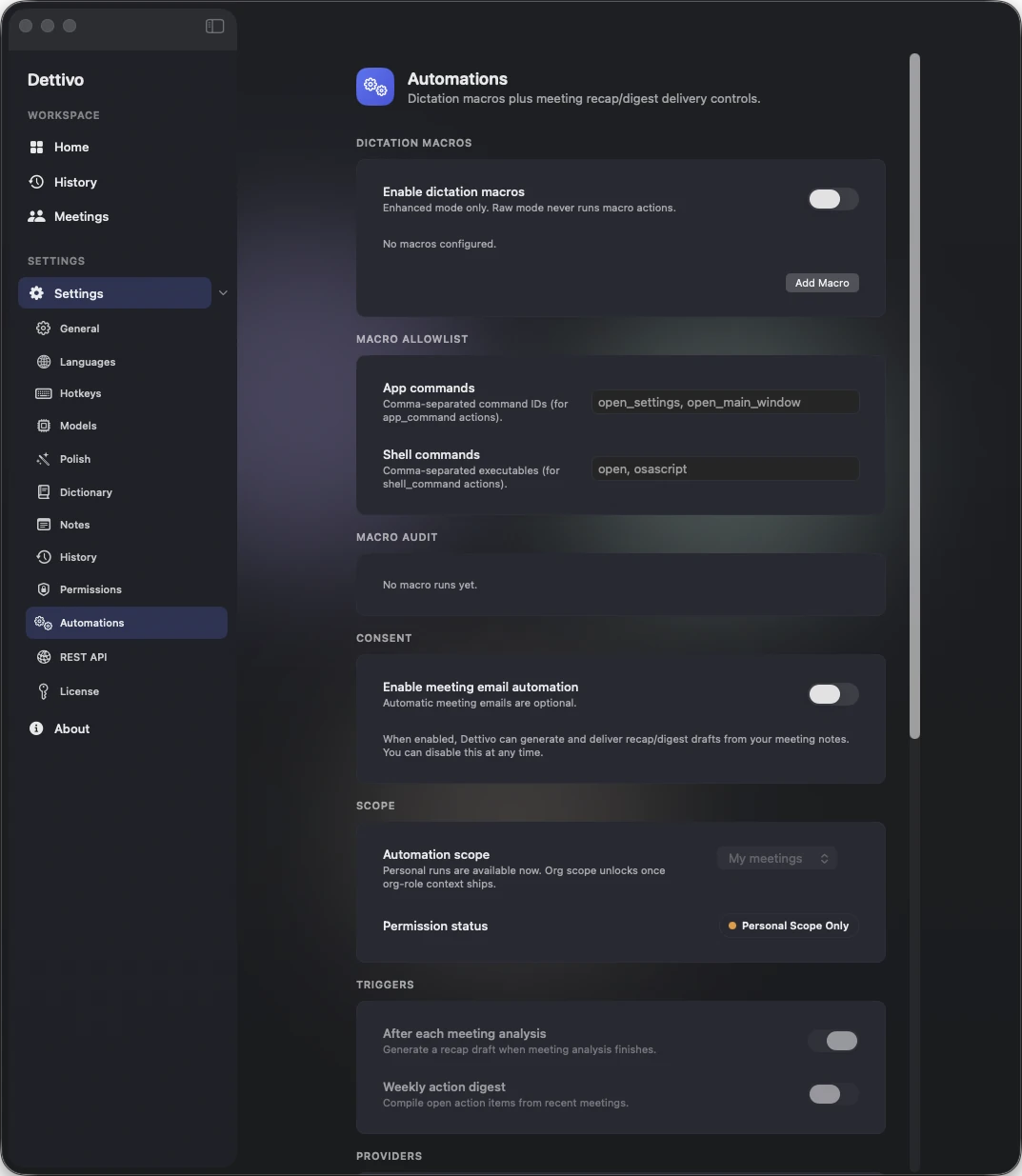
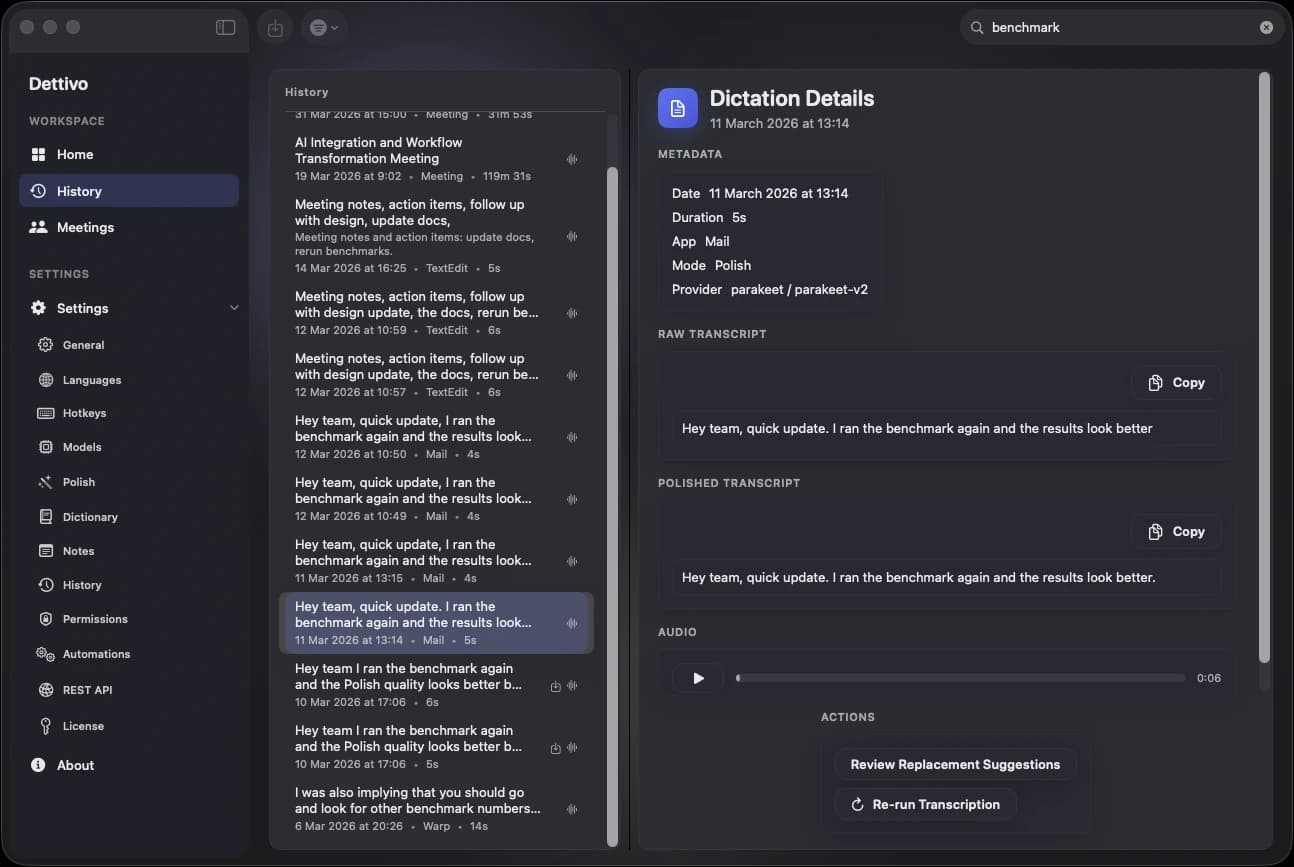
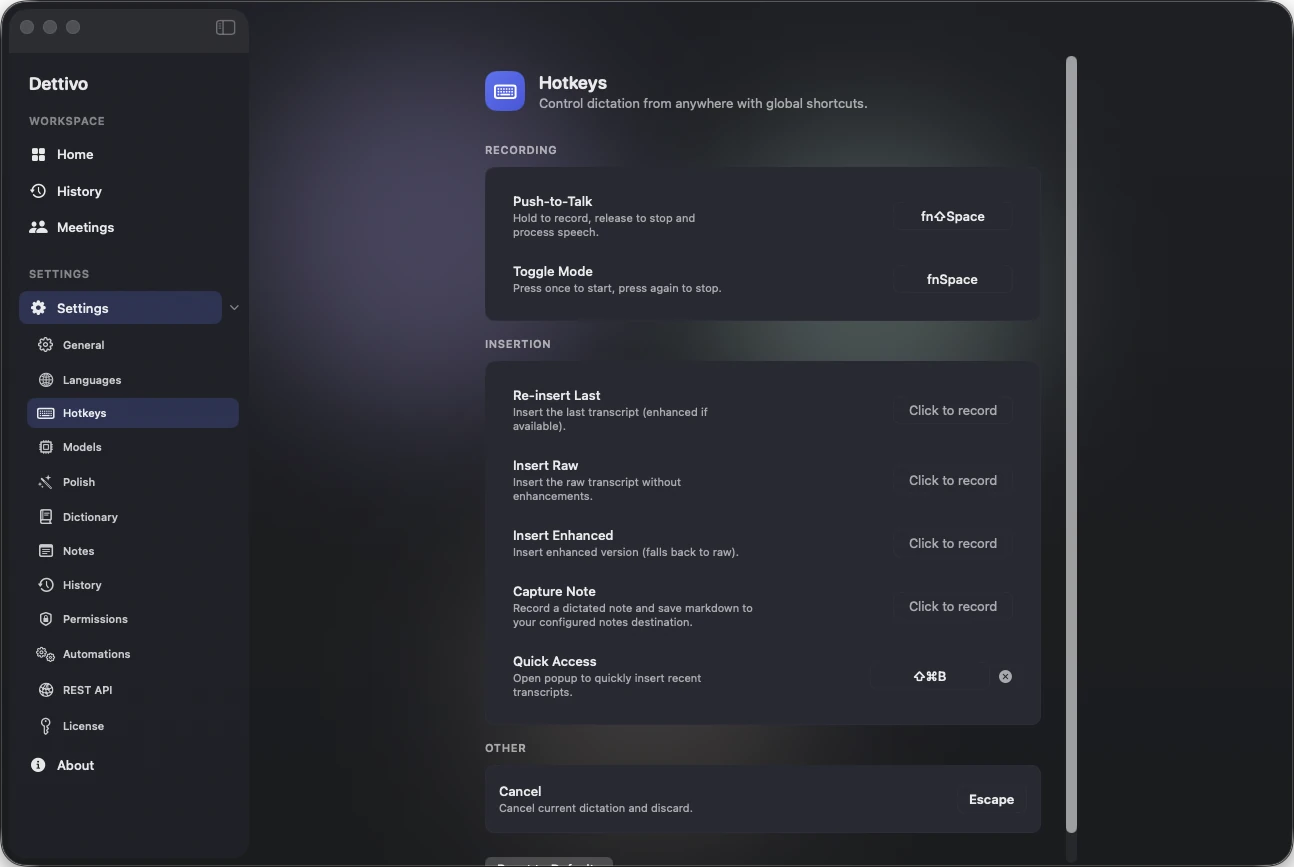
Privacy is architectural, not a policy page. Speech-to-text runs on Apple Silicon by default, meeting capture stays on-device, and the only mandatory network calls are license activation and secure updates.
Dictation and meeting capture run locally on Apple Silicon. Hosted note generation is optional and uses transcript text only after local transcription.
No telemetry, no analytics, no background uploads. What you capture stays on your disk.
Every meeting has a disclosure acknowledgment, an always-on recording indicator, and a delete path, per-meeting and global.
Most voice apps
Receipts in /privacy.
Dettivo
By design. Not by toggle.
The Mac is the platform advantage: Apple frameworks, local models, direct insertion, system audio, and automation surfaces all working together.
Native Swift app
Built on Apple frameworks
Core Audio taps, ScreenCaptureKit, EventKit, MLX Swift. One dedicated Mac app that treats the machine as the speech engine.
Right model for the job
Dictation, meetings, and recall each get a path
Whisper and Parakeet handle speech-to-text. Deterministic Polish handles instant cleanup. Enhanced, summaries, and Q&A use the model that fits the work.
Performance budgets
Measured hot paths, not vibes
Time to first insert, warm starts, model downloads, long-audio throughput, and diarization all get benchmarked because speed is part of the product.
Agent-native surface
Apple Silicon, fully utilized
The same local speech memory is exposed through the app, CLI, REST, and MCP so agents and scripts can use it without a cloud hop.
Your license activates Dettivo and signs every secure auto-update. Three active devices per license. Revoke and re-activate anytime.
License + Secure Updates
Your key unlocks Dettivo and signs every auto-update.
License stored in Keychain on first activation. Same license signs every Sparkle update, so you never install a build that wasn’t signed by us.
Switching Macs? Revoke the old device from Settings > Cloud and activate the new one. Three active at a time.
No cloud account required. We don’t know what you dictate. We only know your license key, its device activations, and your email for recovery.
Five quick answers. The full FAQ has everything else.
No. Dettivo is a one-time lifetime license. No recurring charges, ever.
Just launched
$45 one-time. Secure updates included. Cancel nothing, you paid once.